Thirty Panes website theme: what it includes and who it is for
Thirty Panes is a one-page Ramadan to Eid campaign website theme in English and Arabic. Its features, real screens, setup, and who it fits or does not.
In this post
Thirty Panes is a new website theme on Pulse. It is a one-page Ramadan to Eid campaign site in English and Arabic. It suits a brand that runs offers through the month and wants one page that follows the fast, iftar and Eid by itself. It is not a multi-page site. The theme has one page: Home.
This post covers what Thirty Panes really contains, how the page changes through the month, who it fits, and how to set it up.
What the Thirty Panes website theme is
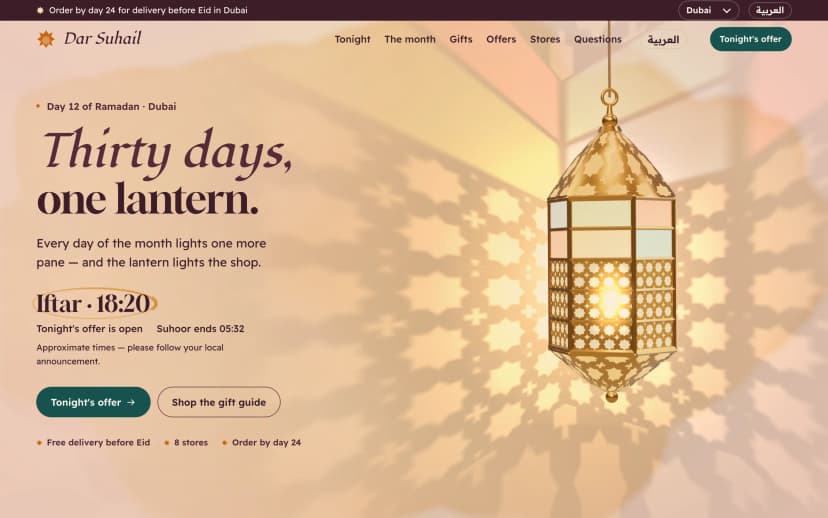
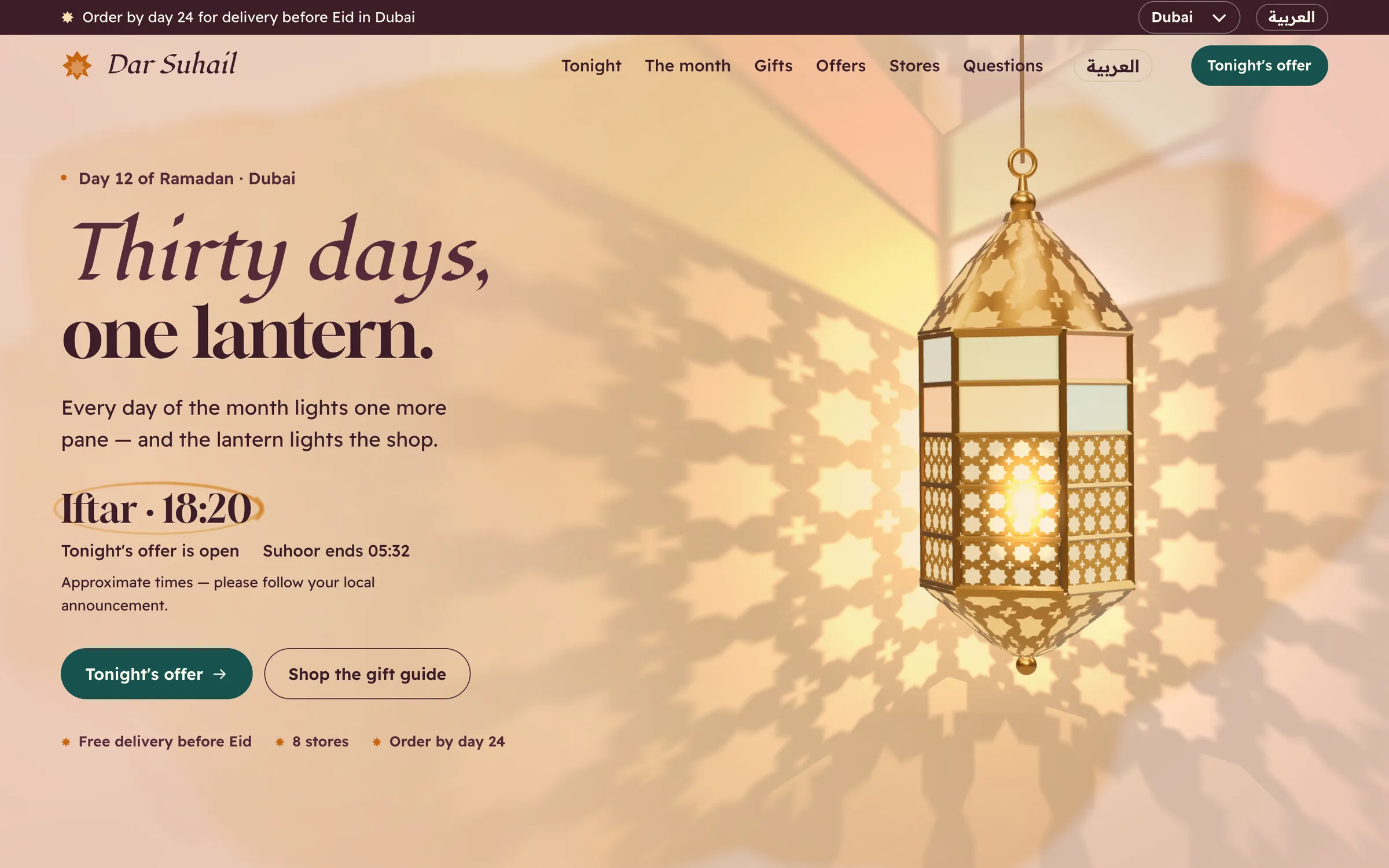
The page is built around one object: a brass lantern with thirty panes. The lantern is the month. Each day, one more pane turns to coloured glass. At iftar in the visitor's own city, the candle inside lights and tonight's offer opens.
Scroll down and the lantern opens into the whole month. Every day shows its iftar and suhoor times. On Eid morning the page changes to its Eid look without anyone touching it.
The product description names brands in the Gulf and South-East Asia as the people it was made for. The idea carries to any brand with a Ramadan campaign, as long as English and Arabic are the languages you need.
- Each dayOne more pane of the lantern turns to coloured glass.
- During the fastThe page shows its day look, with a countdown to iftar in the visitor's city.
- At iftarThe candle lights and tonight's offer opens, at iftar in the visitor's city, not at midnight.
- After iftarThe night look. The store finder says 'opens after iftar' or 'open until 1 am' on its own.
- Before EidA delivery-before-Eid countdown runs for each city.
- Eid morningThe page switches to its Eid look by itself, on the day you set for each region.
What the Home page includes
The theme has one page. These are the features on it, as listed for the product:
- Iftar and suhoor countdown for every city. The times are worked out on the visitor's phone, so each visitor sees their own city.
- English and Arabic with one button. The Arabic version is laid out right-to-left the proper way.
- Eid look on a set day. You set the day for each region, and the page switches by itself.
- Tonight's offer at iftar. The offer opens at iftar in the visitor's city, not at midnight.
- Gift guide. Sorted by who the gift is for and by budget, with prices in each city's currency.
- Store finder. It shows 'opens after iftar' and 'open until 1 am' on its own.
- Delivery-before-Eid countdown per city. Alongside it: offers through the month, an FAQ and a newsletter sign-up.
- Two versions and a guide. A Next.js project, a static HTML version, and a plain-language guide.
The Next.js version uses Next.js 15 with the App Router, React 19 and TypeScript. The motion uses GSAP and three.js.
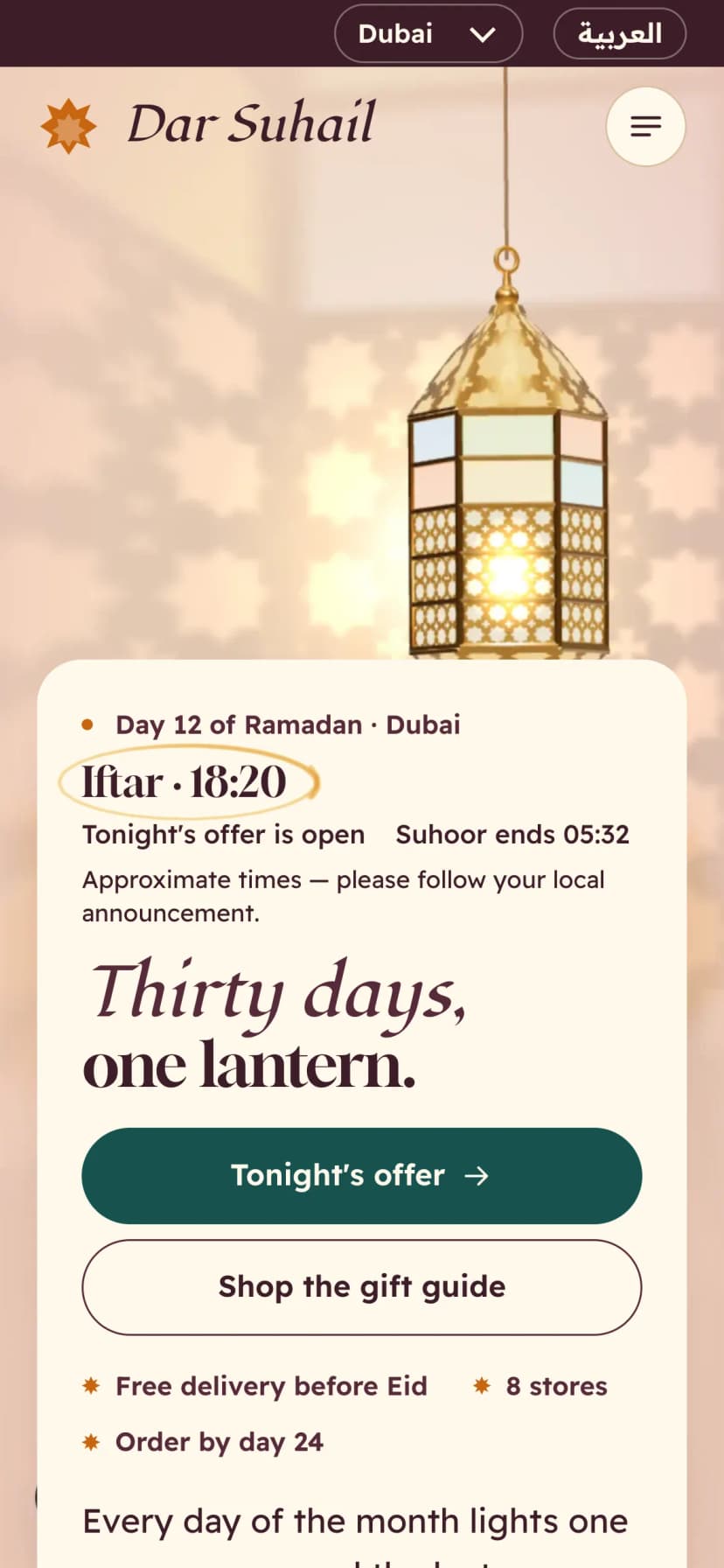
The screens below are the real ones. They show the night look, the fasting day, iftar, and the Arabic Eid look, on desktop, tablet and phone.
Who it fits, and who it does not
It fits:
- A brand running a Ramadan to Eid campaign that wants one page for the whole month.
- Shops with stores in several cities, where opening hours shift after iftar.
- Teams that need English and Arabic on the same page.
- Developers who want a Next.js 15 project, or a static HTML page they can host as plain files.
It does not fit:
- A site that needs many pages. Thirty Panes is one page.
- A full online shop. The feature list has a gift guide and offers. It does not list a cart or checkout, so plan to link out to your existing store.
- Campaigns in other languages. The theme ships with English and Arabic.
- A year-round brand site. The page is made for one season, from Ramadan to Eid.
How to see the demo and set it up
- Open the live demoTry the page on the product page. Press the language button and check the Arabic right-to-left layout.
- Watch the two filmsThey show the lantern moving through the month, from the fasting day to iftar and Eid.
- Pick a versionUse the Next.js 15 project, or the static HTML version if your host serves plain files.
- Install and run locallyFor the Next.js version, run npm install, then npm run dev, and open the page in your browser.
- Add your contentFollow the plain-language guide to change offers, gifts, stores and the Eid day for each region.
- Build and publishRun npm run build for Next.js, or upload the static HTML files to your host.
The commands for the Next.js version are the standard ones:
npm install
npm run dev
npm run build
This page changes with the clock. Before launch, check it at the moments that matter: the fasting day, iftar, the night, and Eid morning. Check the Arabic version at each of those moments too. A campaign page that is wrong at iftar is wrong at its busiest hour.
What to do next
Start with your campaign plan, not the theme. List your offers for each night, your gift ideas by budget, your stores and their hours, and your Eid day for each region. If that list fits one page with a lantern at its centre, the theme will fit too.
For licence questions, every Pulse product uses one licence, explained in this post on client sites.
If the idea suits your brand, the Thirty Panes page has the live demo, both films and every screen shown here. It is a good place to judge it before you plan the month.
Questions
Is Thirty Panes free?
No. It is a paid theme. The product page shows the current details.
How many pages does it have?
One: the Home page. The month, offers, gift guide, store finder, FAQ and newsletter all live on that page.
Do I have to use Next.js?
No. It comes with a static HTML version as well as the Next.js 15 project, plus a plain-language guide.
Does it switch to Eid by itself?
Yes. It switches to the Eid look on the day you set for each region.
Which languages are included?
English and Arabic, switched with one button. The Arabic version is laid out right-to-left.