Clinic website template: the pages patients look for first
A clinic website needs services, doctors, an appointment request, location and trust details. How Epoch's real pages cover each, and what to change first.

In this post
A clinic website template has to answer five questions fast. What do you treat? Who will see me? How do I book? Where are you? Why should I trust you? This guide maps each question to Epoch's real pages. It also says what is missing and what to change first when you re-brand.
Epoch is a Next.js theme built for longevity and precision health clinics. That is narrower than "any clinic". A longevity clinic in Dubai or a concierge medicine practice in Doha fits it closely. A general dental practice in Riyadh can still use the structure. More of the copy will change, though.
What patients look for first on a clinic website
Picture a patient comparing three clinics on a phone, sitting in a car park. They do not read. They scan for five things:
- Services. A list of what you treat, with one page per service.
- Doctors. Names, faces and qualifications. People book a person, not a logo.
- Appointment request. One clear button and a short form.
- Location. Address, area, opening hours, parking and a map link.
- Trust details. Results, patient stories, plain explanations and an FAQ.
For many private clinics, price joins this list. That is especially true for programs and memberships. If a patient cannot find these in a few seconds, they go back to the search results.
What we checked in Epoch's pages
We went through Epoch's page list and feature list. Then we matched them to the five needs.
- Services: Programs and Program. Programs lists your offers. Each Program page goes deep on one offer. The demo uses an "Executive Longevity" program.
- Doctors: clinicians. The feature list names a clinicians page among its ready pages.
- Appointment request: booking, Membership & Pricing. The feature list includes a booking page. The membership plans are built to turn visitors into bookings.
- Trust: The Science, Marker, Results, Case, journal, FAQ. The Science page explains your method. Marker pages use range bars that show test results at a glance. Results and Case pages carry member stories with before/after photos and the change in their test results.
- Location: not listed. The pages in our facts do not include a location or contact page. You will add the address, hours and map yourself.
One caveat. The page list in our product facts names eight page templates: Home, Programs, Program, The Science, Marker, Membership & Pricing, Results and Case. The feature list says 16 ready pages, including clinicians, journal, FAQ and booking. Open the live demo and check those pages before you plan around them.
Two more things matter for a clinic. Sections move between light and dark, and the theme is built to stay easy to read in both, with accessible colour contrast. Older patients notice this. The theme also has phone, tablet and desktop layouts. These are its real screens:
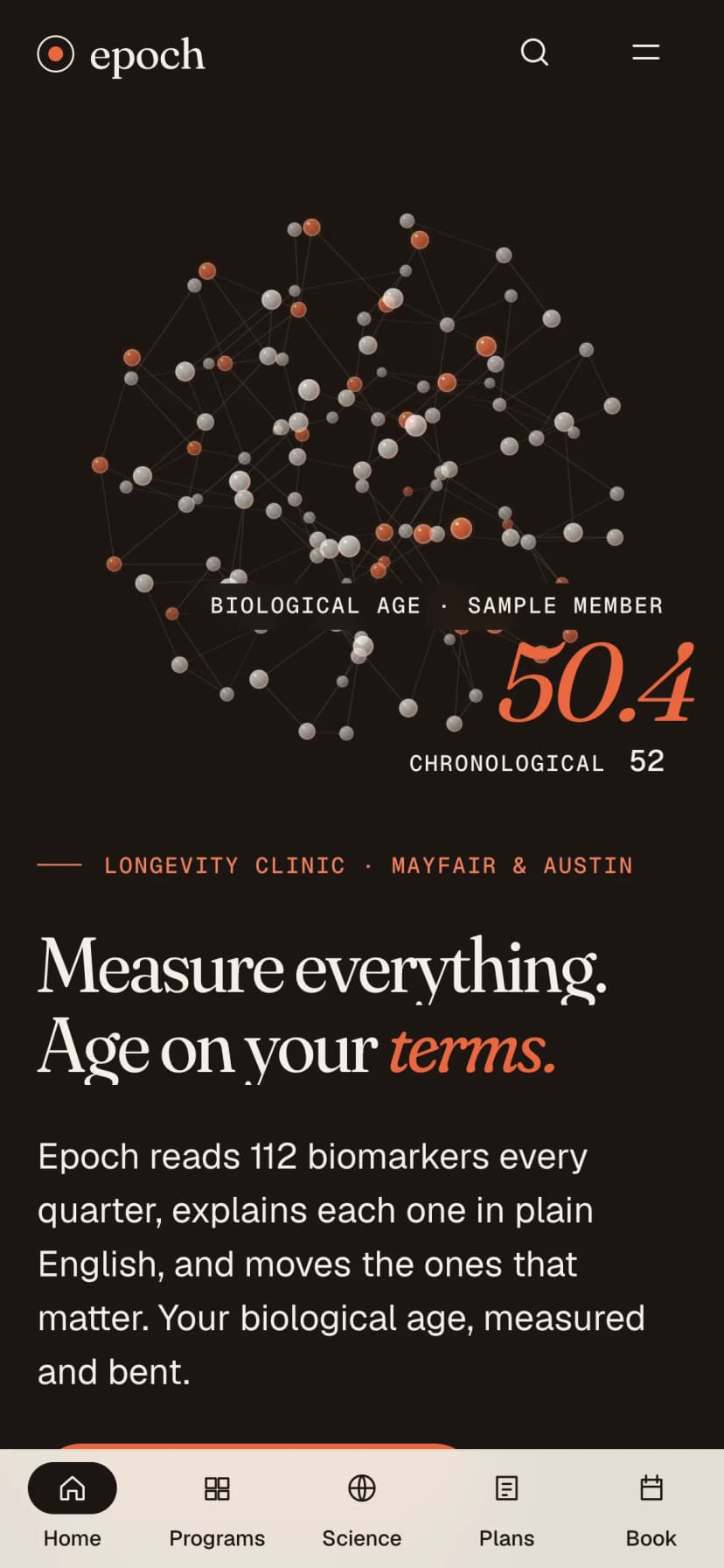
Under the hood it is Next.js 15 with the App Router, React 19, TypeScript and Tailwind CSS 4. The 3D scene that carries on from page to page uses three.js and GSAP.
What to change first when you re-brand
The demo content is written for a longevity clinic. Some of it is very specific. Change these in order, most important first.
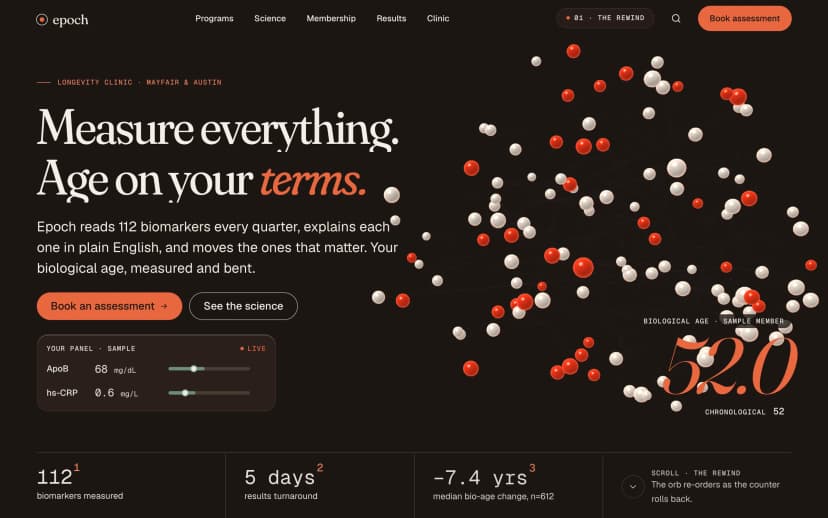
- The hero numbers. The home hero rolls a "biological age" counter from 52 to 44.6. That is demo content. Replace it with a figure you can stand behind, or remove the counter. Patients read hero numbers as promises.
- Programs. Rename them to your real services. Rewrite each Program page in your clinic's words.
- Clinicians. Real names, real photos, qualifications and any licence details your health authority expects you to show.
- Membership & Pricing. Put in your real plans. If you charge per visit, simplify or remove this page.
- Results and Case. Delete every demo story. Only publish before/after photos with written patient consent, and only where your local advertising rules allow them.
- Booking and location. Add your address, hours, phone number and a map link. Put them on the booking page and in the footer.
- Logo, colours and fonts. Do these last. They are visible, but they carry the least risk.
- Replace hero numbersSwap the demo biological age counter for a claim you can back up, or remove it.
- Rename programsTurn Programs and each Program page into your real services.
- Add real cliniciansNames, photos, qualifications and the licence details your authority expects.
- Set plans or remove themFill Membership & Pricing with real plans, or simplify it for per-visit care.
- Clear demo storiesRemove demo Results and Case content. Add only consented patient stories.
- Add location and hoursAddress, hours, phone and map link on the booking page and in the footer.
- Brand lastLogo, colours and fonts once the content is true.
Privacy: keep the appointment request small
Our facts do not describe where the booking form sends its data. They do not mention a calendar or clinic system connection either. Treat the form as a front end. You or your developer connect it to the system your clinic already uses.
A public appointment form should ask for as little as possible. Health details on a website form are sensitive. Check your local data protection and health rules with your own adviser, wherever you operate in the Gulf.
Asks too much
- Symptoms and medical history in a free text box
- ID or insurance numbers on a public page
- Data emailed to a shared inbox
- No privacy notice near the button
Asks enough
- Name, phone or email, service and preferred time
- Medical details collected later, in the clinic
- Data stored in a system your clinic controls
- A short privacy notice in your clinic's name
The clinic is responsible for the privacy notice, not the theme. Write it in your clinic's name and link it from the form.
Arabic and right-to-left layout
Epoch's facts do not mention right-to-left or Arabic support. Do not assume it. The demo is English, left to right.
An Arabic version would mean setting the page direction to right to left and choosing an Arabic font. It would also mean checking every layout that depends on direction. In Epoch that includes the chapter label that stays in view, the range bars and the 3D hero. Each needs testing by hand. Budget time for this, or ask for help through hire.
Many Gulf clinics start with an English site and add Arabic later. Decide based on who your patients are. Do not ship a half-mirrored page.
Result and what to do next
After these steps you have a clinic site where services, doctors, booking and trust content sit where patients expect them. Location and contact details are filled in. Demo claims are gone. The form asks only what it needs.
Questions
Does Epoch support Arabic or right-to-left layout?
The product facts do not mention RTL or Arabic support. Plan, build and test an Arabic version yourself.
Does the booking page send appointments to my calendar?
The facts do not describe a booking back end. Connect the form to the system your clinic already uses.
Is it only for longevity clinics?
It is built for longevity clinics, med spas, functional and concierge medicine, and peptide, hormone or GLP-1 providers. Other clinics can adapt the structure, with more copy changes.
Is there a location or contact page?
Not in the page list we have. Add address, hours, phone and a map link to the booking page and footer.
Can an agency use it for a client's clinic?
Yes. Every Pulse product has one licence that covers unlimited sites, yours or your clients'.
If your clinic sells programs, memberships or test-based care, Epoch already has most of the pages above. Open its demo, check the clinicians and booking pages, and list what you will add. For agencies, the licence details are in this post.