Job portal website template: the pages and features you need
A job portal needs a jobseeker side, an employer pipeline and an admin view. What HireWise's real screens cover, and what you still wire up.

In this post
A job portal website needs four things. These are a public front door, a jobseeker workspace, an employer workspace with a hiring pipeline, and an admin view to keep it clean. A good job portal website template gives you the screens for all four. You still build the data, accounts and AI behind them. This guide walks through each part using HireWise, our hiring platform template. It shows what its real screens cover and what you still wire up yourself.
The problem: a job portal is four products in one
Most people start a job board by drawing a list of jobs and a search box. That is the smallest part of it.
A working portal serves different people with different goals:
- Jobseekers want to find roles, keep a CV, and see where their applications stand.
- Employers want to post roles, review candidates, and move them through stages.
- Campuses (if you serve graduates) want to run hiring drives for a whole cohort.
- Admins want to moderate content, watch costs and spot problems.
Each group needs its own home screen, its own navigation, and its own empty, loading and error states. If a template only covers the public job list, you design the other three yourself. That is where most of the time goes.
What a job portal website template should include
This is the checklist we used when we looked at HireWise. It is useful for judging any template.
- A landing page that works on phone, tablet and desktop.
- A jobseeker home with matches and application status in one place.
- CV tools. At minimum a profile. Better, a resume builder and feedback on the CV.
- An employer pipeline. A per-job board where candidates move between stages.
- Shortlisting help. Some way to rank or filter a large pile of applicants.
- Interview support. Scheduling at least. Some platforms add recorded or live interviews.
- An admin area with moderation.
- Every state. Loading, empty, error and offline screens, not just the happy path.
HireWise is built on Next.js 15 (App Router), React 19, TypeScript and Tailwind CSS 4. It has more than 60 screens across four workspaces: jobseeker, employer, campus and admin. Every screen runs on realistic mock data, so you can click through it before writing any backend code.
What HireWise includes, screen by screen
Here is what the published screenshots show. Each one is captured at desktop, tablet and mobile widths.


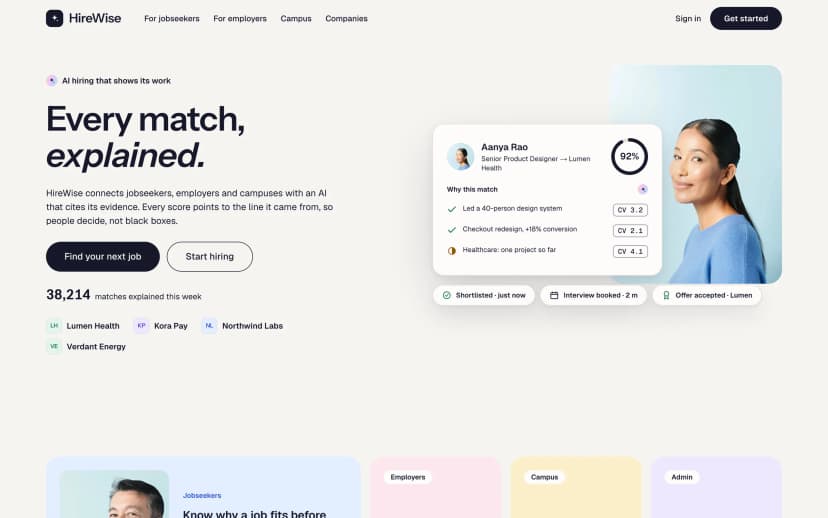
Landing. The public front page, in three viewport sizes.
Jobseeker home. The jobseeker's dashboard. HireWise's AI assistant is called "Wise". Every match it suggests carries evidence chips. A chip cites the CV line, job requirement or interview moment the match came from. A jobseeker can see why a role was suggested, not just a score.
Resume Intelligence. Feedback on the CV, next to an AI resume builder. Anything Wise writes wears an iridescent aurora mark until a person edits it. Users can tell AI-written text from their own at a glance.
Pipeline kanban. The employer view for a single job. It is a drag-and-drop board of hiring stages, with an AI shortlist on top.
The feature list also names screens that are not in the screenshots above:
- A live AI interview room, an interview replay and a feedback report.
- Campus drives and a cohort skill-gap heatmap for university hiring.
- An admin overview, an AI cost tracker and moderation tools.
- Loading, empty, error and offline states throughout.
One honest note on scope. Our published page list for HireWise does not name a stand-alone public job board with search filters, or public company profile pages. HireWise is shaped as a hiring platform with workspaces, not a classic listings site. If your plan depends on a large public job search with filters and SEO-indexed company pages, open the live demo first. Check that those screens match what you need before you commit.
What you still wire up yourself
HireWise is a UI template. Every screen works, but on mock data. This is the line between what you get and what you build.
Included in the template
- 60+ designed screens across jobseeker, employer, campus and admin
- Evidence chips and aurora marks for AI output, as UI
- Drag-and-drop pipeline and AI shortlist views
- Loading, empty, error and offline states
- Realistic mock data so every screen is clickable
You wire up yourself
- Database, API and saving real jobs, applications and CVs
- Sign-up, login and roles for each workspace
- A real AI model that returns matches with their evidence
- Email, notifications and file storage for CVs
- Cookie consent, privacy notices and data deletion
A few of these deserve more detail.
The AI. The evidence chips are a design pattern, and a good one for hiring. But the chips only show what your model returns. To keep the promise, your matching service must return the source of each judgement. That means the CV line or the job requirement. If it returns a bare score, the chips have nothing to show.
Personal data. A job portal stores CVs, contact details and interview recordings. In the UK and EU that falls under GDPR. You will need a lawful basis, a retention policy, and a way for people to export or delete their data. The template does not include a cookie banner or consent flow. Plan those from the start, not at launch. Take legal advice for your own case.
Accessibility. We have not published an accessibility audit for HireWise. We make no ADA or EAA claim for it. If you serve public-sector or large enterprise clients, budget time to test it yourself.
Motion. HireWise uses GSAP, three.js and Lenis for its motion. Check how that motion behaves on the low-end devices your users carry.
From template to live portal, in order
This is the order we would follow on a client project. It keeps the mock data working until each real piece is ready.
- Run it locallyInstall and start the dev server. Click through all four workspaces on mock data and list the screens you will keep.
- Cut what you do not needNo campus hiring? Remove that workspace and its navigation before you add any backend code.
- Add accounts and rolesAdd sign-up and login, then route each role to its own workspace: jobseeker, employer, campus or admin.
- Swap mock data for an APIReplace one data source at a time: jobs first, then applications, then pipeline stages. Keep the empty and error states.
- Connect your AI modelHave it return the evidence behind every match, so the chips cite a real CV line or requirement.
- Privacy and consentAdd a cookie notice, privacy page, retention rules and data export or deletion before real CVs arrive.
- Build and shipRun a production build, test on phone and desktop, then deploy.
The first and last steps use the standard commands:
npm install
npm run dev
npm run build
If something fails on first install, our post on what broke when we set up our own templates as a buyer covers the common snags.
Result, and what to do next
At the end you have a portal whose screens were designed together. The jobseeker, the employer and the admin share one visual language. Every state is accounted for. And the AI explains itself on every match. The hard parts left are the ones no template can do for you: your data, your accounts, your model and your legal duties.
If you are building for clients, one licence covers it. Every Pulse product allows unlimited sites, personal or commercial. Our licence post answers the usual agency questions.
If HireWise's four-workspace shape matches your plan, its page has the screenshots, the product films and the live demo: HireWise. Check the listing and filter screens there against the checklist above.
Questions
Does HireWise include a backend or database?
No. It is a UI template. All 60+ screens run on realistic mock data. You add the database, API and accounts yourself.
Is the AI in HireWise connected to a real model?
No. The AI matches, shortlists and resume feedback are shown with mock data. You connect your own model and have it return the evidence the chips display.
What stack does it use?
Next.js 15 with the App Router, React 19, TypeScript and Tailwind CSS 4. Motion uses GSAP, three.js and Lenis.
Does it include empty and error states?
Yes. Loading, empty, error and offline states are included, not only the filled-in screens.
Is it GDPR or ADA ready out of the box?
We make no such claim. It has no cookie banner or consent flow, and we have not published an accessibility audit. Plan and test both yourself.