Travel website template: what a booking-ready site needs
A travel website needs routes, itineraries, a booking form and a phone layout. Here is each one in Lunetta's real pages, plus what it does not include.

In this post
A booking-ready travel website needs four things. It needs clear destinations, a readable itinerary for each trip, a short booking or enquiry path, and a layout that works on a phone. A travel website template can get the photos right and still get the booking path wrong.
Below we walk through each part in order, using the real pages and screens of Lunetta, our night-train theme. We also say plainly what it leaves out. The biggest gap is that it has no payment engine.
The problem: a travel site has to sell a trip, not a mood
A traveller lands on your site with a few plain questions. Where can I go? When do I leave and when do I arrive? What exactly am I paying for? How do I book it from my phone?
The operator has questions too. Who is travelling tonight? Which beds are still free? Where do I change a booking?
A template that only answers the first set gives you a brochure. A booking-ready site answers both. That means public pages for the traveller and a working view for the staff.
What we checked in a travel website template
We used this list when we reviewed Lunetta. It works for any travel website template you are comparing.
- Destinations. Can a visitor see every route or trip on one page?
- Itinerary. Can they compare departure and arrival times without opening each trip?
- The product itself. Can they see what they are buying, not just a hero photo?
- Booking path. How many steps from choosing to booking?
- Phone layout. Does booking still work with one thumb?
- Staff side. Is there a dashboard, or only public pages?
- Stack. Is it a current framework your team already knows?
Lunetta has seven public pages: home, routes, route details, cabins, on board, booking and help. It also has a staff dashboard with seven screens. It is built on Next.js 15 (App Router), React 19, TypeScript and Tailwind CSS 4. GSAP, three.js and Lenis handle the motion and scrolling.
- See all routesOne page lists every trip, so the visitor can scan destinations before committing to one.
- Open a routeA detail page shows departure, wake-up and arrival for that trip.
- Choose the exact cabinThe visitor sees what they are buying: the compartment, its size and which side it faces.
- Book in three stepsA short booking flow, from a sliding panel on phones.
- Staff see it tonightThe crew works from the occupancy board and bookings list in the dashboard.
Steps: building a booking-ready travel website, in order
1. Start from the routes page, not the home page
Destinations are the core of a travel website. Build that page first and let the home page point to it.
In Lunetta the Routes page draws each route as one night of sky. Departure, wake-up and arrival sit on the same visual line. A visitor can compare several trips at a glance without opening each one. The screens include this page at desktop, tablet and phone sizes.
If you sell daytime tours or city breaks, keep the idea and change the drawing. The goal is the same: every trip on one page, comparable at once.
2. Give every trip its own detail page
The itinerary lives on the detail page. Lunetta ships a sample route, Milano to Palermo, with its own page. Replace it with your real routes and times.
Keep the detail page focused on facts a traveller needs to decide. When do I leave? When do I wake up? When do I arrive? The night-sky layout already answers those questions.
3. Show the thing they are actually buying
This step is where many travel sites stay vague. A traveller booking a sleeper bed wants to know which bed.
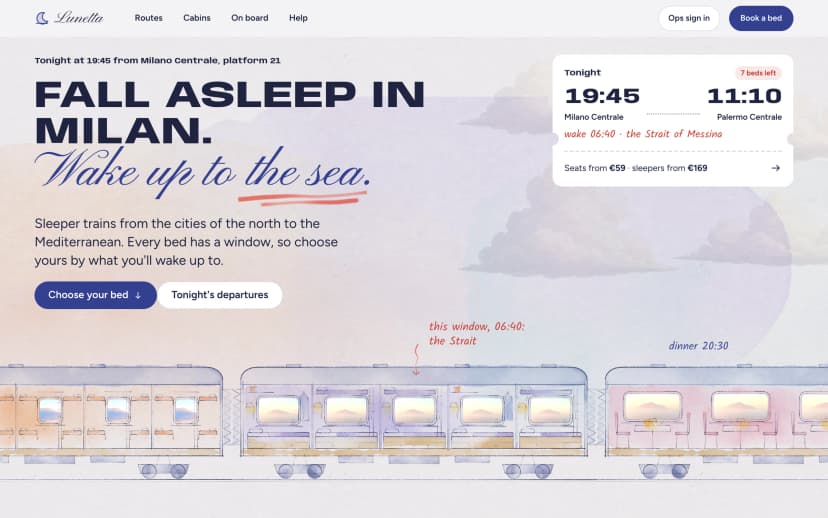
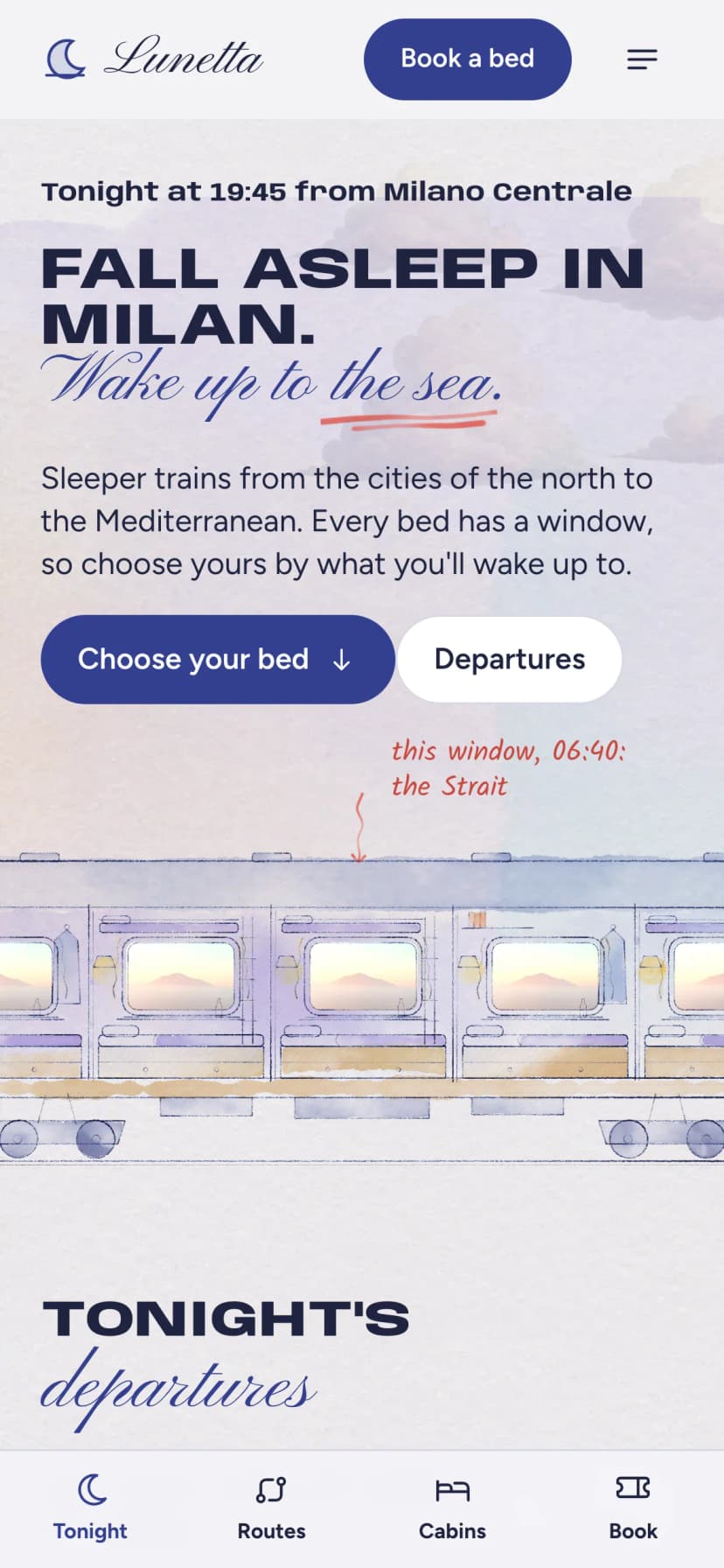
Lunetta is built around a hand-drawn train. Every window shows the real sunrise view for that bed. Travellers pick an exact compartment, sea side or hill side. The Cabins page draws real measurements onto the carriage, so size is not a guess.
The On board page covers what the trip is like. The Help page is where you answer questions before they become emails. Both cut down on enquiries that only ask what is included.
4. Keep the booking path short
Lunetta books a chosen bed in three steps, on its own Booking page. Three steps is a sensible target for any travel site. Each extra step is a place where a traveller can stop.
Be clear about what this page is. It is the front end of booking. Lunetta does not include a payment engine. You will connect the flow to your own payment provider and to wherever your real availability lives.
5. Check the phone layout early
Many travellers browse and book on a phone. Check this before you add content, not after launch.
On phones Lunetta behaves like an app. Travellers swipe the carriage, tap a compartment, and book from a sliding panel. You can switch between its real desktop, tablet and phone screens below.
6. Set up the staff side
A booking-ready site needs somewhere for staff to work. Lunetta includes a full staff dashboard. It has tonight's occupancy board, a bookings list, booking details, forms and settings, across seven screens. The crew runs tonight's departures from the same train drawing the travellers use.
Treat it as the interface for your operations. Wire its data to your own back end.
7. Install and run it
Setup is the standard Next.js routine:
npm install
npm run dev
npm run build
Run the dev server, replace the sample routes and cabins, then build for production.
The result, and what it does not do
Follow the steps and you get a travel site with clear destinations and comparable itineraries. Travellers pick an exact cabin and book in three steps. The layout works on a phone, and staff get a dashboard for tonight's departures.
Here is the honest split between what the theme gives you and what you still add.
Included in Lunetta
- Seven public pages, from home to booking and help
- Routes drawn as one night of sky for quick comparison
- Cabin pages with real measurements on the carriage
- Three-step booking, sliding panel on phones
- Staff dashboard with seven screens
You still add
- A payment provider: there is no payment engine
- Your real routes, times, cabins and availability data
- A cookie notice if you add analytics or third-party scripts
- Your own copy for the On board and Help pages
A note on fit. Lunetta is designed for sleeper trains, ferries and slow-travel operators. Its whole interface is a carriage and a night sky. A hotel or package-holiday agency would be fighting that design rather than using it.
A note on privacy for UK and EU sites. The facts we have for Lunetta do not list a cookie banner. If you add analytics, ads or an embedded booking widget, plan a GDPR-compliant consent notice. We have not published an accessibility audit for this theme, so test it against your own ADA or EAA requirements.
What to do next
Take the checklist above to any travel website template you are considering. Ask for the routes page, a trip detail page, the booking flow and the phone layout. Then ask what happens after someone presses book.
If you build for clients, every Pulse product has one licence that covers client sites. Our post on which licence you need for a client site explains it. If you want help connecting payments or a ticketing back end, our hire page is the place to ask.
If your trips happen overnight, by train or by sea, Lunetta already has the pages and screens described here. You can look through all of them before deciding.
Questions
Does Lunetta take payments?
No. It does not include a payment engine. The three-step booking flow is the front end; you connect it to your own payment provider.
Can I use it for a ferry or slow-travel company, not just trains?
Yes. It is designed for sleeper trains, ferries and slow-travel operators. The interface is built around a carriage and a night sky, so it suits overnight routes best.
Does the booking work on phones?
Yes. On phones travellers swipe the carriage, tap a compartment and book from a sliding panel. Real phone, tablet and desktop screens are on the product page.
Is there an admin area for staff?
Yes. The staff dashboard has seven screens, including tonight's occupancy board, bookings, booking details, forms and settings.
What is it built with?
Next.js 15 with the App Router, React 19, TypeScript and Tailwind CSS 4, with GSAP, three.js and Lenis for motion and scrolling.