Restaurant website with table booking: what it needs
A restaurant website needs a menu, hours, a map, a booking form and a phone layout. What Dailies' real pages cover, and what the booking form does not do.

In this post
A restaurant website with table booking needs five things: a readable menu, clear opening hours, a short booking flow, a way to find the door, and a layout built for phones first. Everything else is mood. This guide walks through each part using the real pages of Dailies, our restaurant theme. It also says plainly what its booking form does and what you still have to connect.
If you are building a website for restaurant bookings for yourself or a client, use this as a checklist. It should help even if you never use our theme.
The problem: guests decide on a phone, in a hurry
Most people looking at a restaurant site want three answers. What do you serve? Are you open tonight? Can I get a table? They usually ask from a phone, often while standing somewhere else.
A site that hides the menu in a PDF, or sends people to a phone number for every booking, loses some of them. A site that looks generic loses others. The job is to answer the practical questions quickly and still give the place a character.
That is the balance we checked Dailies against. It is a heritage restaurant site told as a short 1960s-style documentary. The story is the hook. The menu and the booking page are the work.
What a website for restaurant bookings needs
Here is the list we used. It applies to any restaurant site, not only ours.
- A menu people can read on a phone. Real text, not an image or a PDF. Dish names, a short line on each, and room for a signature dish to stand out.
- Opening hours and contact details. Visible without hunting. Ideally in the footer of every page.
- A booking flow that takes under a minute. Night, time, party details, done. A clear confirmation at the end.
- Directions. An address, and usually a map link.
- A phone-first layout. Every page checked at mobile width, not just shrunk.
- A way for staff to see the bookings. Otherwise the form is just an inbox.
Dailies covers the menu, the booking flow, the phone layout and the staff view. Opening hours and maps are not listed as their own pages or features. We come back to that below.
Going through Dailies page by page
Dailies has five public pages plus a back office. These are the steps a guest takes, in order.
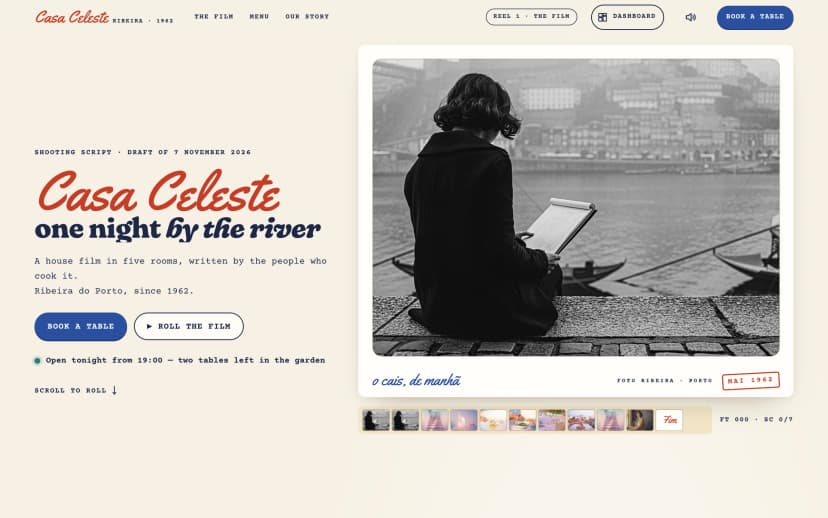
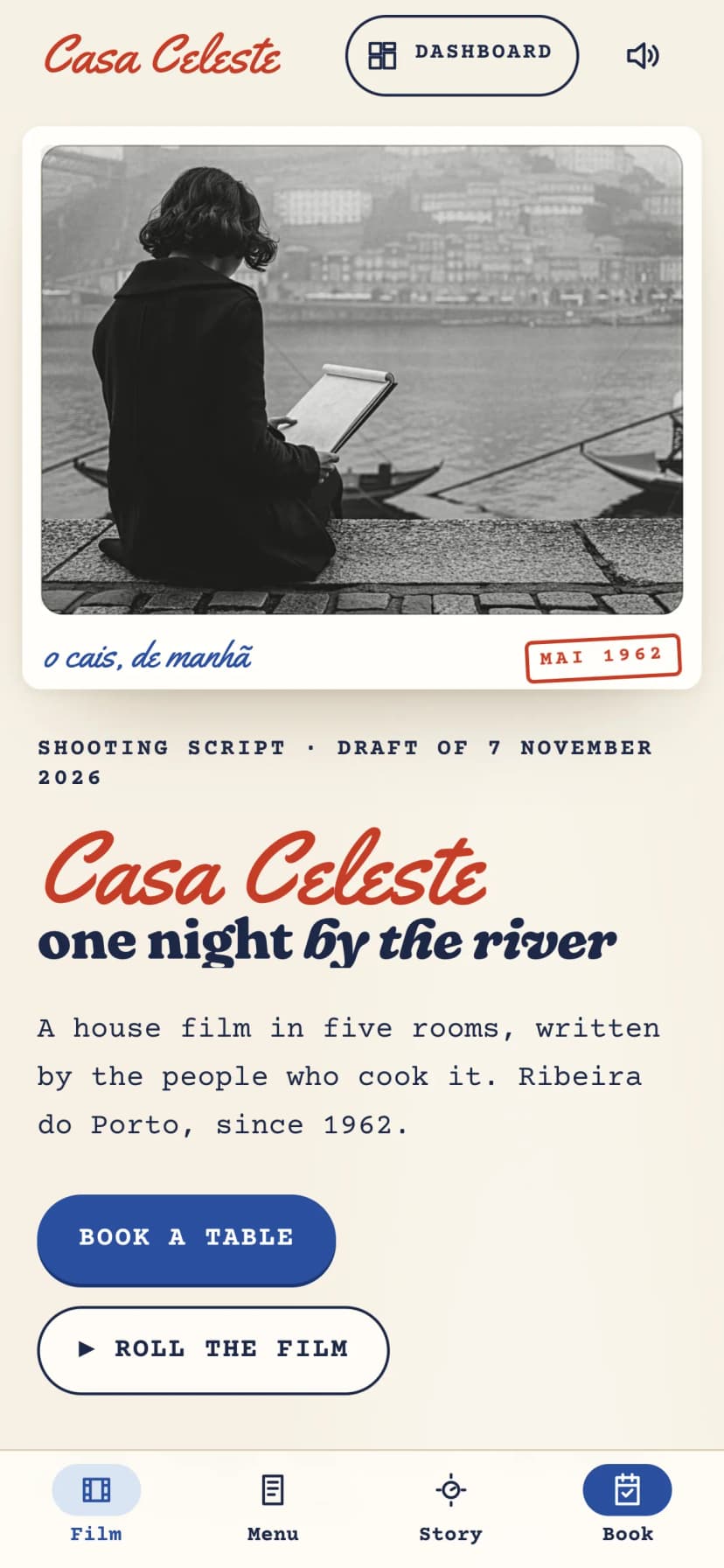
- The film (home). Guests scroll a real script, and each camera direction plays on the frame beside it. Old ledgers, licences and receipts appear as proof, typed like archive paper. This is the story page that sets the tone.
- The menu gazette. The menu is printed like the house newspaper. It is real page content, so it reads on a phone and can be indexed.
- A dish. Each signature dish gets its own page, with a dated story under it. The demo uses caldo verde. Hand-painted ink and watercolour drawings show the dishes, the house and the street.
- Our story. The restaurant's history, decade by decade. Useful for family places with a long past.
- Book a table. Guests pick the night, the time and the room on a hand-drawn floor plan. The confirmation appears as a film call sheet, with one tap to add the dinner to a calendar.
- Dashboard. The back office shows tonight's floor plan, the reservation book, charts and the other screens. It has seven screens in total, in light and dark modes.
You can switch between the real desktop, tablet and phone screenshots below. They cover the film, the menu, a dish and the story page.
The stack is Next.js 15 with the App Router, React 19, TypeScript and Tailwind CSS 4. Motion uses GSAP, Lenis and three.js. Projector sound is optional and off unless you turn it on. Setup is the usual Next.js routine:
npm install
npm run dev
npm run build
What the booking form does and does not do
This is the part most people want straight. Here is the guest's path through booking, as the product describes it.
- Open Book a tableThe guest arrives from the menu, a dish page or the film.
- Pick the nightChoose the date for dinner.
- Pick the timeChoose a sitting time for that night.
- Pick the room on the floor planThe rooms are shown on a hand-drawn floor plan, so the guest chooses where they sit.
- See the call sheetThe confirmation is styled as a film call sheet, with one tap to add the dinner to a calendar.
- Staff see it in the bookThe back office shows the reservation book and tonight's floor plan.
So the theme gives you the whole interface: the form, the floor plan picker, the confirmation screen and the staff dashboard.
What it does not give you, based on everything in the product listing:
- No payments or deposits. Nothing in the features mentions card payments, deposits or no-show fees. If the restaurant needs those, plan to add a payment provider.
- No named delivery service. The listing does not say which email or SMS service sends confirmations. Treat sending messages as something you connect.
- No link to an existing reservation system. If the restaurant already uses a booking platform, nothing here says it syncs with one. You would wire that yourself, or replace the form's submit step with that platform's API.
- No opening-hours page or map feature. Neither is a listed page or feature. Add hours to the footer or the story page, and add an address with a map link.
The short version:
In the theme
- Book a table page: night, time and room on a hand-drawn floor plan
- Confirmation styled as a film call sheet
- One tap to add the dinner to a calendar
- Back office with tonight's floor plan and the reservation book
You still wire up
- Where bookings are stored, and the server code that saves them
- Email or SMS delivery of the confirmation
- Payments or deposits, if the restaurant takes them
- Opening hours, address and a map link
This is normal for a front-end theme. A real booking system needs a database, rules about capacity, and someone deciding what happens when a table is double-booked. Those depend on the restaurant, so they belong to your build.
Result and what to do next
Measured against the checklist, the menu, booking interface, phone layout and staff dashboard are covered. Hours, maps, storage, messaging and payments are yours to add. That is a clear split, and it is better to know it before a client asks.
If you are planning a restaurant site, these steps keep the work in order:
- Write the menu as real text first. Pick two or three signature dishes that deserve their own page.
- Decide where hours and the address live. The footer of every page is the simplest choice.
- Choose how bookings are stored and confirmed before you style anything.
- Test every page at phone width, especially the booking step.
- Give staff one place to see tonight's bookings.
For a similar walk-through in another field, see our post on what a booking-ready travel site needs. If you are building for a client, this licence post answers the usual questions.
If a family restaurant with a story to tell is your client, Dailies gives you the menu, the booking interface and the back office to start from. You then connect the parts that depend on how that restaurant runs.
Questions
Does the Dailies booking form take payments or deposits?
Nothing in the product features mentions payments or deposits. If the restaurant needs them, plan to add a payment provider to the booking step.
Are booking confirmations sent by email?
The confirmation is shown as a film call sheet with one tap to add the dinner to a calendar. The listing does not name an email or SMS service, so plan to connect your own.
Does it include opening hours and a map?
Neither is a listed page or feature. Add hours and the address to the footer or the story page, with a link to a map.
Does it work well on phones?
Yes. The film, menu, dish and story pages all have phone screenshots, and the theme is built for smooth motion on every phone.
Can staff manage reservations?
The back office includes tonight's floor plan, the reservation book and charts, across seven screens with light and dark modes. It needs your own data source behind it.