AI website template: launch page and dashboard in one kit
AURORA is an AI website template with a marketing site and product dashboard in one. Its real pages, the text files you edit, and what it does not include.

In this post
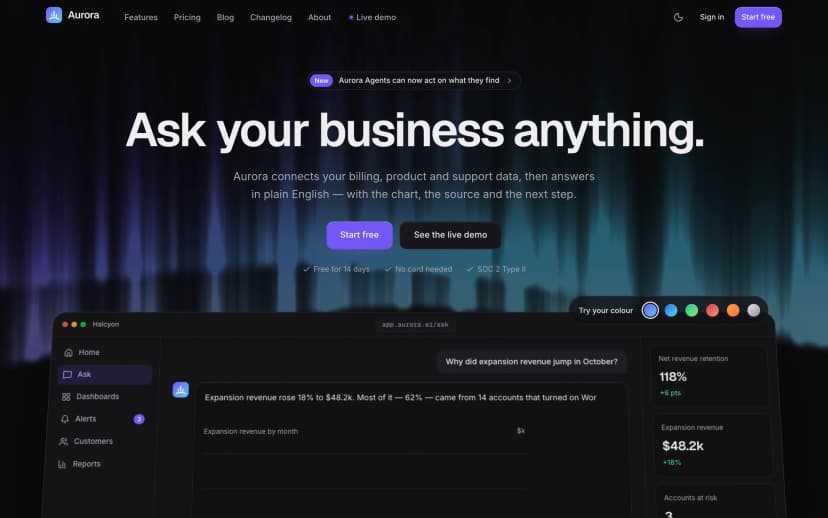
AURORA is an AI website template that gives you two things in one kit: a marketing site and a product dashboard. Both share one look, one brand colour and one dark-first design. You change the name, colour, plan prices and testimonials by editing a few text files, not by rewriting components.
This post covers what is really inside, which files-level changes you make first, and what the kit does not do for you.
The problem: a SaaS website and an app that look like two companies
Most AI and SaaS teams start with two separate things. One is a launch page from one app website template. The other is a dashboard from a different UI kit. The fonts differ, the buttons differ, and the brand colour is set in two places. Visitors notice when the sign-up flow lands them in a product that looks unrelated to the page that sold it.
AURORA is built to avoid that gap. The marketing pages and the dashboard come from the same kit, on the same stack:
- Next.js 15 (App Router), version 15.5.28
- React 19.3.1 and TypeScript 5.9.3
- Tailwind CSS 4.3.3
- GSAP 3.15.0 for motion and three 0.181.2 for the light scene
What the kit contains
The product page lists 11 pages and 14 app screens. The marketing side includes Home, Features, Pricing, Blog, a Blog post template, About, Changelog and Contact. The Dashboard is the entry to the app side.
On the marketing side, a few things stand out:
- Live brand colour. Visitors can try any brand colour. The hero light, buttons, charts and dashboard re-light at once.
- A scroll story. A short sequence shows the assistant answering a real question, over a living light scene.
- Plans to compare. The Pricing page lays out plans side by side.
- Dark first, light too. Dark mode is the default. Light mode is equally finished, with a one-click switch.
On the dashboard side, you get analytics, customers, billing, team settings and an AI assistant screen. The charts draw themselves in and are linked: pick a team and the other charts follow. Every state is designed, not just the happy path. That means empty, loading, error and success states, confirmations, and friendly form errors.
The kit also ships a logo set, 18 glass icons, customer logos, avatars, illustrations and a social image. You will likely replace the customer logos and avatars with your own before launch.


The screenshots above are the marketing pages (Home, Features, Pricing, Blog) at desktop, tablet and phone widths. The dashboard screens are not in this gallery; use the live demo on the product page to click through them.
Change the name, colour and prices from text files
The kit is set up so routine edits do not need code changes. Here is the order we suggest on a fresh copy.
npm install
npm run dev- Install and run locallyRun npm install, then npm run dev. Open the home page and the dashboard so you can watch each change land.
- Set the product nameEdit the name in the text files. It appears across the marketing pages and the app.
- Pick the brand colourTry colours live in the site first, then set your choice. Buttons, hero light and charts follow it.
- Set plan pricesEdit the plan names and prices in the text files. The Pricing page reads from them.
- Swap testimonialsReplace the sample quotes with real ones from your customers. Do not ship the sample text.
- Build before you deployRun npm run build to catch type or route errors before going live.
If you want to know how one colour reaches every button, focus ring and chart, we wrote that up separately in how to re-brand a Next.js SaaS kit from one file. It explains the CSS variables and color-mix() approach.
Limits: what you still wire up
AURORA is a front end. Be clear about that before you plan a launch date.
Included in AURORA
- Marketing pages, blog, changelog and contact page
- Dashboard screens: analytics, customers, billing, team, assistant
- Designed empty, loading, error and success states
- Dark and light modes with a switch
- Logos, icons, avatars, illustrations, social image
Not listed in the kit
- Sign-in and user accounts
- Real payments behind the billing screen
- A connected AI model behind the assistant
- A database for customers and analytics data
- A cookie banner or consent tool
Nothing in the kit's feature list covers authentication, payment processing or a live AI model. Plan to connect those yourself, or with your developer. The same goes for consent: if you add analytics or tracking scripts for visitors in the UK or EU, you will need a cookie and consent setup under GDPR. The kit does not include one.
The kit also has no separate docs section on our site yet, and we have not published Lighthouse scores for it. We are not making accessibility compliance claims for AURORA in this post.
Who it fits, and what to do next
AURORA fits an AI or SaaS startup that wants its saas website and its app to look like one product from the first day. It also fits agencies building launch sites for those startups, since one kit covers both halves. It is a weaker fit if you only need a single landing page, or if your brand is light and quiet rather than dark and glowing.
A sensible next step: open the demo, click from the Pricing page into the dashboard, and check that the linked charts and the assistant story match how you describe your product. If they do, the AURORA kit page has the films, the live demo and the full screen list.
Questions
Does the AI assistant screen answer real questions?
It is a designed screen and a scroll story. The kit does not list a connected AI model, so you wire the assistant to your own backend.
Can I change the brand without touching components?
Yes for the name, colour, prices and testimonials. Those live in a few text files, and the colour reaches buttons, charts and the dashboard.
Is there a light mode?
Yes. The kit is dark first, with an equally finished light mode and a one-click switch.
Which framework versions does it use?
Next.js 15.5.28 with the App Router, React 19.3.1, TypeScript 5.9.3 and Tailwind CSS 4.3.3.
Can I use it for a client's startup?
Pulse products use one licence covering your sites and client sites, SaaS included. See our post on licences for client work.
For the licence details mentioned above, read which licence you need for a client site.