3D website examples you can actually ship
Two 3D website examples, Peel and Lightwork, checked for what makes motion shippable: reduced motion, phone layouts and what a slow phone really shows.

In this post
A 3D website you can actually ship has three things beyond the 3D itself. It has a calm version for visitors who turn motion off. It has a phone layout designed for thumbs, not a shrunken desktop. And it still works on a phone without much graphics power. Below are two 3D website examples from our catalogue, Peel and Lightwork, checked against those three points. We also cover what each one does not tell you yet.
The problem with most 3D website examples
Most 3D website examples are recorded on a fast desktop. The video looks great. Then a client opens the live site on a three-year-old phone on mobile data. The first screen is blank while a scene loads. The scroll stutters. The buy button sits under an animation the visitor cannot get past.
There is a second group who never sees the effect at all. Some people set their device to reduce motion because large movement makes them unwell. A site that ignores that setting is a problem for them, and for you if you sell to them.
So when we look at a 3D or motion theme, the question is not "is the 3D good?" The question is "what does every visitor see, including the ones on a slow phone or with motion turned off?"
What we checked in each theme
We looked at four things, in this order:
- The calm version. Is there a reduced-motion version, and does it tell the same story or just hide content?
- The phone layout. Is the phone version designed on its own terms, with swipes and reachable buttons?
- The action. Can the visitor reach the thing that matters (buy, hire, contact) without sitting through the film?
- The editing path. Can a developer re-brand it without a 3D modelling tool?
One honest gap first. We do not have a published Lighthouse score for either theme, so this post quotes no performance numbers. What we can describe is what the themes contain and how they behave by design.
Both themes run on the same stack: Next.js 15 (App Router), React 19, TypeScript and Tailwind CSS 4, with three.js for 3D, GSAP for animation and Lenis for scroll.
Example one: Peel, a 3D label story for a drinks brand
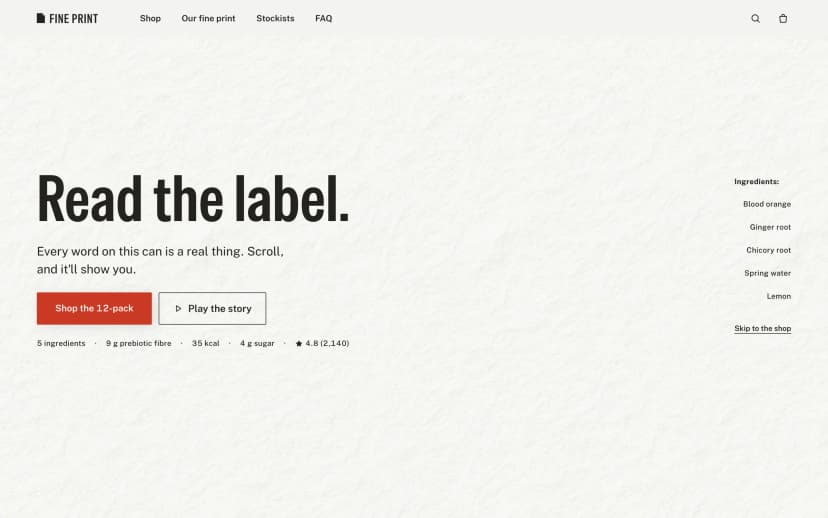
Peel is an eight-page theme for drinks and direct-to-consumer brands. The demo brand is Fine Print, a prebiotic sparkling botanical soda. On the home page the can's paper label peels off and lies down as a road. Each printed ingredient stands up as the real thing: a pop-up Etna slope with blood oranges, ginger root rising through paper soil, a chicory meadow you walk around, a stream the ingredients settle into. Then the label rolls back onto the can, and the story ends on a shelf you buy from.
Here is how it does on our four checks.
Calm version. Peel has a still-picture version. It is used for visitors who prefer reduced motion and for devices without graphics power. That second part is what matters for the slow-phone case. A phone that cannot run the 3D scene gets still pictures, not a blank box.
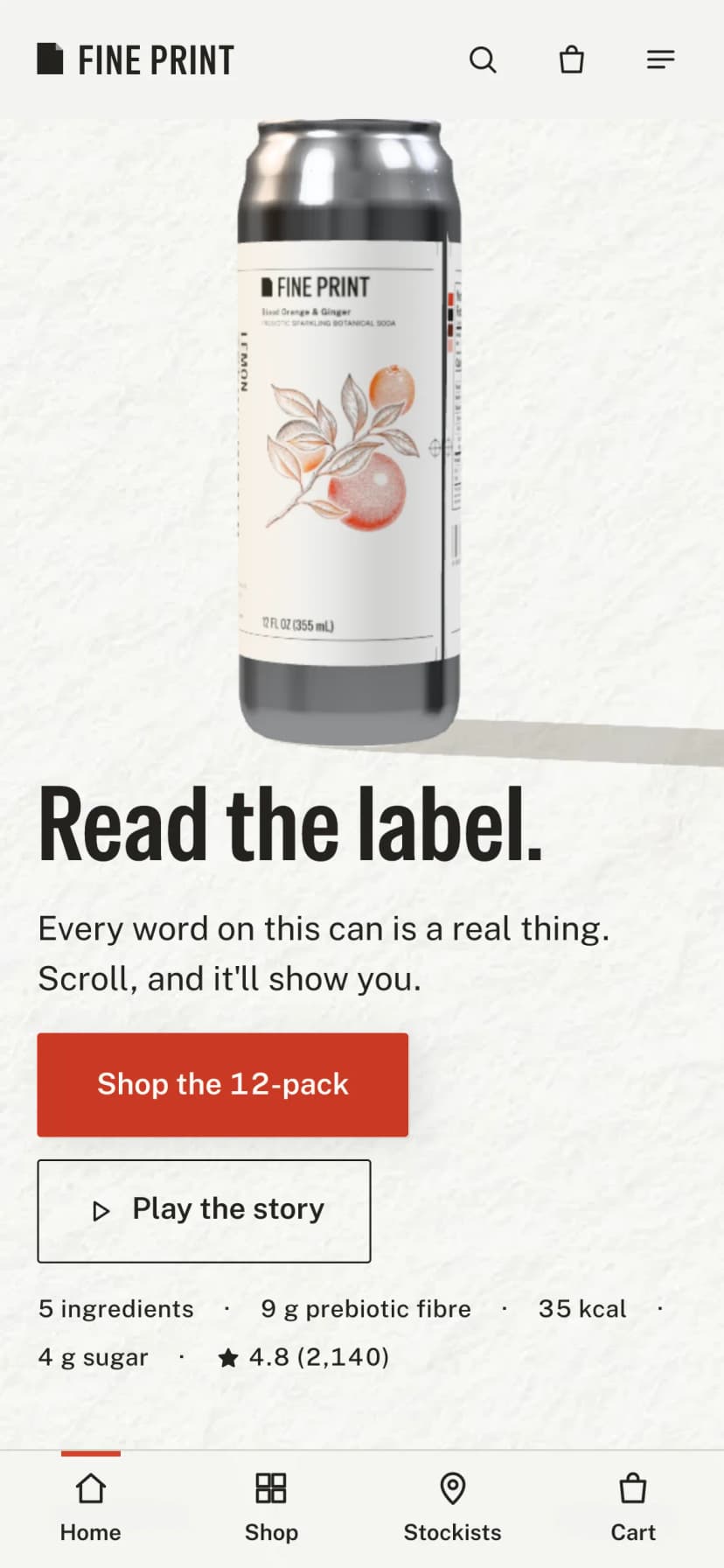
Phone layout. On phones the label unrolls down the screen. Products sit on swipe rails, and a sticky buy bar stays in reach.
The action. The story ends on a shelf where shoppers add 12-packs, subscribe or build a mixed 12. The sticky buy bar means a shopper on a phone does not have to finish the film to buy. There is also a Shop page, four product pages and a Build a mixed 12 page.
Editing path. You re-brand Peel by editing one product list. Labels, pages and the story update together. Product pages also include a real Nutrition Facts table that lights up the matching line printed on the can.
What Peel does not include: it ships the shop pages and flows, a store finder with a paper map, a wholesale enquiry form and a searchable FAQ, all ready to fill in. You still connect your own payments and back end. If you collect wholesale enquiries from EU or UK visitors, add your own privacy notice next to the form.
Example two: Lightwork, a free cinematic résumé
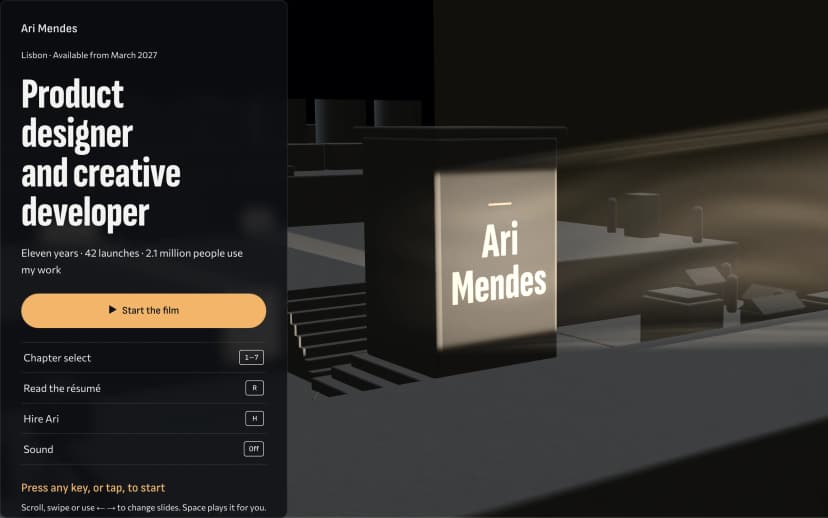
Lightwork is a one-page personal site that plays like the opening of a game. A white plaster model of a hill town sits on a long table in a dark studio. A projector maps your career onto it, chapter by chapter. Halfway through, the visitor picks a reel: Product, Brand or Motion. The ending and the offer change to match. At the end the blind goes up and the town stands in daylight around one empty plinth that reads your project goes here.
Calm version. Lightwork has a calm version for visitors who prefer less motion. It tells the same story as still frames. Nothing is cut; it is just not animated. Note that the facts we have describe this for reduced-motion visitors. They do not describe a separate low-power fallback the way Peel's do, so test it on your own slowest phone.
Phone layout. On phones it behaves like an app: one swipe per chapter, bottom sheets and a thumb-friendly action bar.
The action. Résumé, Hire and Contact are one tap away from the first screen. Nobody has to watch the film to reach you. There is a printable PDF résumé too. The Hire form puts the visitor's project name on the empty plinth while they type.
Editing path. It is built from photos you already have. You swap every word and image in one file, with no 3D modelling. It also ships ten ready case studies with problem, approach, results, numbers and client quotes for you to replace with your own.
Full 3D film
- Peel: the label peels off and each ingredient stands up in 3D
- Lightwork: a projector maps your career onto a model town
- Scroll-driven motion with three.js, GSAP and Lenis
Calm version
- Same story, told as still pictures or still frames
- Shown to visitors who prefer reduced motion
- Peel also uses it on devices without graphics power
- Buy, Hire and Contact stay reachable
How to check a 3D website on a slow phone
Whichever 3D theme you pick, test it the way a visitor meets it. Do not judge it from the dev server. Install and build it first:
npm install
npm run build
Use npm run dev while you edit, but test the production build before you show a client. Then work through these checks in order.
- Serve the production buildDev mode is slower and adds overlays. Judge motion only on the built site.
- Turn on reduce motionSwitch it on in your phone or OS accessibility settings, reload, and confirm the calm version tells the whole story.
- Use your oldest phoneOpen the site on a real, older device over mobile data, not desktop device emulation.
- Watch the first screenNote what shows before the 3D is ready. It should be readable content, not an empty area.
- Reach the action fastFrom the first screen, try to buy, hire or contact without finishing the story.
- Fill in every formType into each form on the phone. Check the keyboard does not hide the submit button.
The reduced-motion setting is read by browsers through a standard media query. If you want the background, MDN documents prefers-reduced-motion. For the wider phone checks we use, see our mobile-friendly checklist.
The result, and what to do next
Both examples pass the test that matters most: the story survives with motion turned off, and the main action is reachable on a phone without sitting through the film. Peel goes one step further on low-power devices by falling back to still pictures. Lightwork's strength is how little a person needs to change: one file of words and images, no 3D tools.
Neither theme gives you a performance score to show a client today. Run the checks above and keep your own notes per device. That record is more useful to a client than any claim on a product page.
If you want to see how a calm version and a phone layout are put together before you commit to a paid theme, Lightwork is free. Download it, turn on reduce motion, and open it on your oldest phone. For more personal-site options, see our personal website templates comparison.
Questions
Do I need a 3D modelling tool to edit these themes?
No. Lightwork is built from photos and you swap every word and image in one file. Peel is re-branded by editing one product list, and labels, pages and story update together.
What does a phone without graphics power see on Peel?
Peel shows a still-picture version of the story for devices without graphics power, the same version used for visitors who prefer reduced motion.
Is there a Lighthouse score for Peel or Lightwork?
Not yet. We do not have a published score for either theme, so test the production build on your own devices.
What stack do they use?
Both use Next.js 15 (App Router), React 19, TypeScript and Tailwind CSS 4, with three.js, GSAP and Lenis for the 3D and motion.
Is Lightwork free?
Yes, Lightwork is free. Peel is a paid theme.