Free portfolio website: set one up in an afternoon
Set up a free portfolio website in one afternoon: pick a free theme, swap in your name and projects, test it on your phone and put it online at no cost.

In this post
You can have a free portfolio website online by this evening. Pick a free theme, put in your own name, photos and projects, then put it on a host with a free plan. This guide walks through each step in order, with the real commands and the limits we know about.
It is written for students and first-time builders. Most of you will read this on a phone, so the steps are short.
The problem: a portfolio website free of cost, that still looks finished
You need somewhere to send a teacher, a recruiter or a first client. A PDF CV in a WhatsApp chat is easy to lose. A link is easy to share and easy to remember.
Many "portfolio website free" templates are cut-down demos. The good parts sit behind a paywall. On Pulse, the free themes are full themes, not lite copies. We wrote about that in free website templates that are full themes.
For a personal portfolio, three free themes fit:
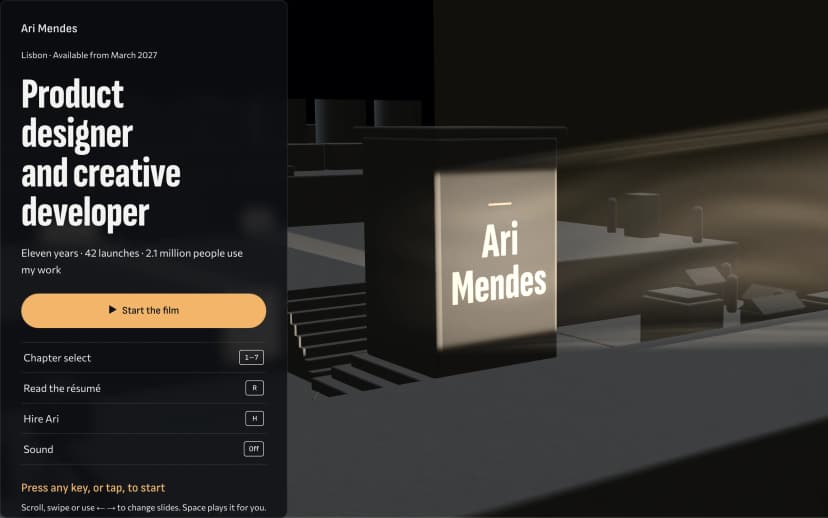
- Lightwork: a cinematic one-page résumé. A projector lights a white model town, one career chapter at a time.
- Playable Résumé: a side-scrolling résumé that visitors walk through, level by level.
- Interactive Résumé: a playable résumé theme for freelancers.
This guide uses Lightwork as the example. The same steps work for the other two.
What we checked before recommending Lightwork
We looked at what a first portfolio really needs, and what Lightwork actually contains.
- One file for your content. Every word and image is swapped in one file. You do not need to do any 3D modelling. It is built from photos you already have.
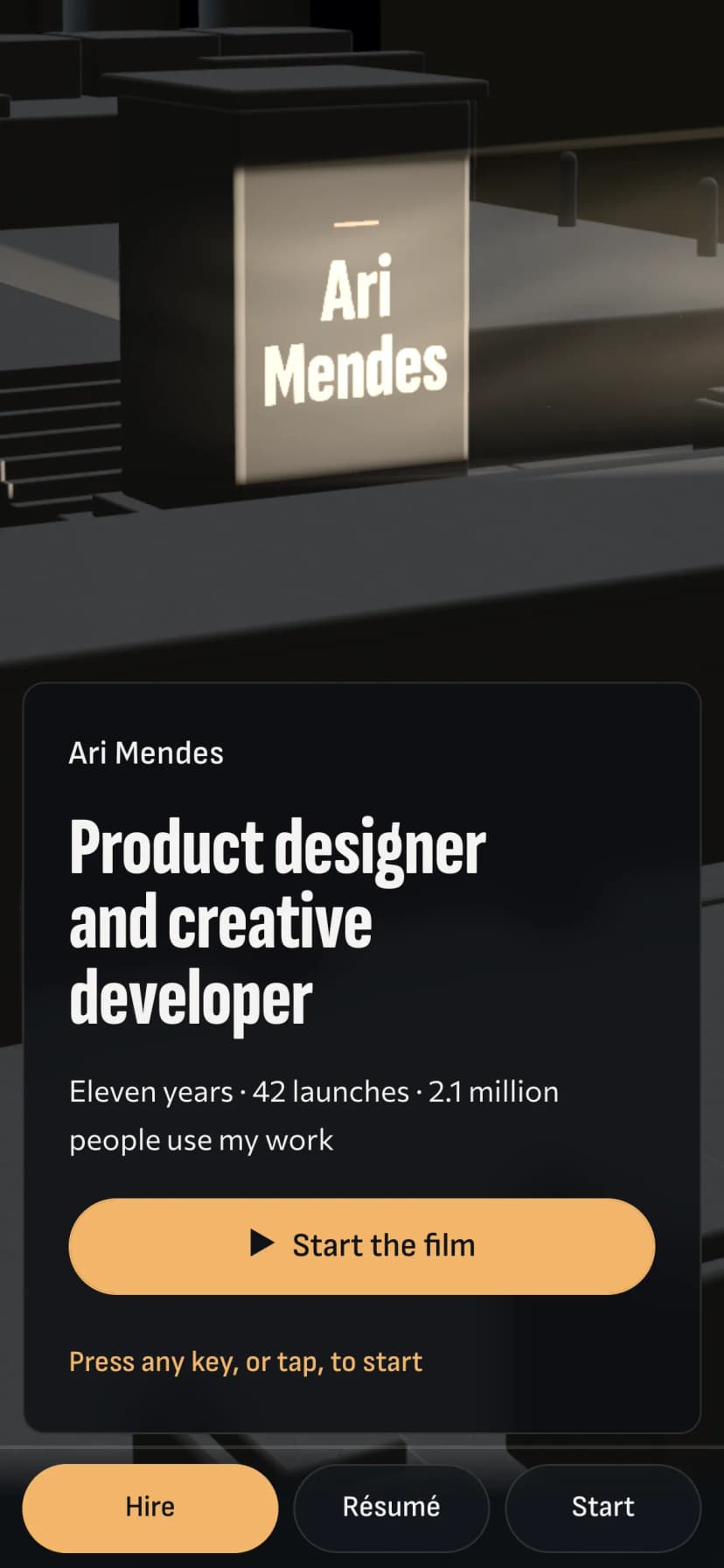
- A real CV. Résumé, Hire and Contact are one tap away from the first screen. There is a printable PDF résumé.
- Phones first. On a phone it feels like an app: one swipe per chapter, bottom sheets and a thumb-friendly action bar.
- A calm version. Visitors who prefer less motion see the same story as still frames.
- Project pages ready to fill. It ships with ten ready case studies. Each has a problem, approach, results, numbers and client quotes.
The limits, plainly:
- Lightwork is one page. There is no blog and no separate project pages.
- There are no written docs for it on our site yet. The steps below are standard Next.js steps.
- It is a 3D theme (it uses three.js and GSAP). Test it on an older phone before you share it.
- It is a code theme (Next.js 15, React 19, TypeScript, Tailwind CSS 4). It is not a drag-and-drop builder.
Steps in order: from download to live link
- Pick a free themeOpen the Lightwork page, or Playable Résumé or Interactive Résumé, and get the free download.
- Install and run itUnzip, open the folder in a terminal, run npm install, then npm run dev.
- Swap in your contentChange your name, chapters, photos and projects in the one content file.
- Fix the case studiesKeep only real projects. Delete sample numbers and quotes you cannot back up.
- Test on your phoneSwipe each chapter, open Hire and Contact, and check the printable résumé.
- Build and deployRun npm run build, push to GitHub, and connect a host with a free plan for Next.js.
1. Get the free theme. Open Lightwork and download it. You get a zip file. Unzip it into a folder you can find again, such as Documents.
2. Install Node.js. The theme runs on Next.js, which needs Node.js on your computer. Install the current long-term support version from the official Node.js site. A laptop is easier than a phone for this part.
3. Install the theme's packages. Open a terminal in the theme folder. On Windows you can use PowerShell or the terminal inside VS Code. Then run:
npm installThis downloads everything the theme needs. On a slow connection it can take a while. Let it finish.
4. Start it on your computer.
npm run devOpen http://localhost:3000 in your browser. You should see the model town and the projector. Keep this running. When you save a change, the page updates.
5. Change your name and projects. Open the theme folder in a code editor, such as VS Code, which is free. Find the content file that holds the words and image paths. Change:
- your name and one-line title
- each career chapter (for a student: school, first project, internship, what you want next)
- the photos (put your own images in and point the file at them)
- your contact details for the Contact and Hire sections
You do not need to touch the 3D code. The town is built from your photos and words.
6. Be honest with the case studies. This step matters most. The ten sample case studies include numbers and client quotes. Those are placeholders, not yours. Keep two or three real projects: a final-year project, a college club website, a freelance logo job. Write the problem, what you did and what happened. If you have no client quote, remove the quote. A short true page beats a long made-up one.
What ships in the theme
- Ten sample case studies
- Sample numbers and client quotes
- Placeholder name and career chapters
What you publish
- Two or three real projects you can explain
- Only numbers and quotes you can prove
- Your name, photos, chapters and contact details
7. Test on your phone. Most people who open your link will be on a phone. Swipe through every chapter. Tap Résumé, Hire and Contact. Try the Hire form: it puts the visitor's project name on the empty plinth as they type. Print the PDF résumé once to check it. Our mobile-friendly checklist lists the exact checks we use.
8. Build it. Stop the dev server and run:
npm run buildIf this finishes without errors, the site is ready to go online. If it fails, the message usually names the file and line. Often it is a missing image or a typo in the content file.
9. Put it online for free. Create a free GitHub account and upload the project as a repository. Then connect it to a host that supports Next.js. Several hosts have a free plan for personal sites. The official Next.js deploying guide explains the options. You get a free web address, and you can add your own domain later if you want one.
The result
You end the afternoon with one link. It opens on a phone like an app. It tells your story chapter by chapter. Visitors can pick a reel (Product, Brand or Motion), and the ending changes to match. It has a printable résumé and a Hire form. It cost nothing but your time.
The free licence covers this. Every Pulse product has one licence that allows personal and commercial sites. Read it at /legal/license if you plan to build sites for clients later.
If you want a different style later, paid résumé themes such as Stet and Gesture exist. You do not need them to start.
What to do next
Share the link in your CV, your LinkedIn and your email signature. Update it each time you finish a real project. Keep the case studies short and true.
If a cinematic one-page portfolio suits you, Lightwork is a good free place to start, and you can watch its film on the theme page first. If you want something more like a game, look at Playable Résumé instead. For a side-by-side view, see best personal website templates in 2026.
Questions
Is Lightwork really free, or a lite version?
It is free and it is the full theme: the film, the reel choice, the Hire form, the printable résumé and the calm version are all included.
Do I need to know 3D modelling?
No. The town is built from photos you already have. You change every word and image in one file.
Will it work on a cheap phone?
It is designed phone-first, with one swipe per chapter and a calm still version for less motion. It is still a 3D theme, so test it on an older phone before sharing.
Does it include a blog or more pages?
No. Lightwork is a single page. If you need a blog, you would add it yourself.
Can I use it for client work later?
Yes. Every Pulse product has one licence covering personal and commercial sites, yours or your clients'.